 Build faster with AI — Get started with the Nium MCP Server
Using docs with AI
Every page in the Nium developer docs includes a Copy for LLM button. With a single click, you can send the page's content in an AI-friendly format directly to your coding assistant or LLM—no manual copying, cleanup, or reformatting required.
It's a simple feature, but it makes it much easier to bring Nium documentation into your AI-powered development workflow.
The Copy for LLM button
Click the arrow next to Copy for LLM to open a menu.
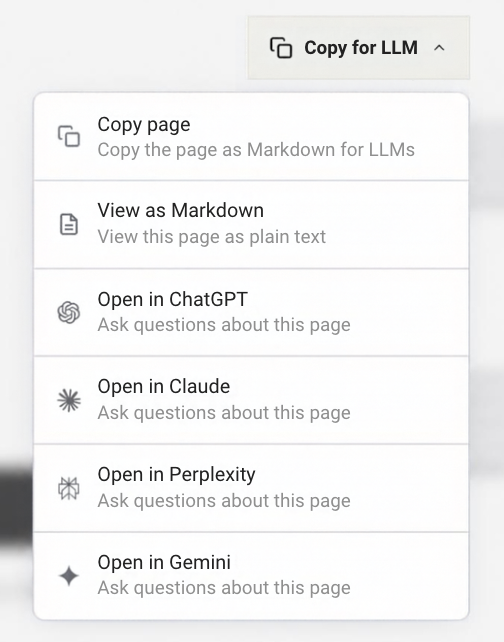
Copy page
Copies the full page as clean Markdown. Paste it into any AI chat, system prompt, or pipeline.
Use this when you want to bring the context to your AI tool — not open a new one.
View as Markdown
Opens the page as plain text in your browser. Useful for inspecting the raw content, sharing it with a teammate, or piping it into a script.
Open in ChatGPT
Opens ChatGPT with the page content pre-loaded. Ask questions immediately — no setup required.
Open in Claude
Opens Claude with the page content pre-loaded. Claude works well for detailed API analysis, step-by-step troubleshooting, and comparing parameter combinations.
Open in Perplexity
Opens Perplexity with the page content pre-loaded. Good for research-style questions where you want citations alongside answers.
Open in Gemini
Opens Google Gemini with the page content pre-loaded.
When to use each option
| You want to… | Use |
|---|---|
| Ask a quick question about a specific page | Open in Claude / ChatGPT / Perplexity / Gemini |
| Feed docs into your own AI tool or IDE | Copy page |
| Inspect or share the raw Markdown | View as Markdown |
| Ground an AI pipeline with a specific doc page | Copy page or View as Markdown |
| Reference a page in a system prompt | Copy page |
What to ask once you're in
The page content gives your AI the full context it needs. Here are prompts that work well — replace the specifics with whatever you're actually building.
Understand an API
"Explain the required parameters for creating a corporate customer. Which ones are region-specific and which apply everywhere?"
"What's the difference between
customerType: CORPORATEandcustomerType: INDIVIDUALin terms of the KYC flow?"
"Walk me through this page's error codes. Which ones are retriable and which are terminal?"
Troubleshoot a problem
"I'm getting a 422 on this endpoint. Here's my payload — based on this docs page, what am I missing?"
"My payout is stuck in COMPLIANCE_REVIEW. Based on this page, what triggers that state and what are my options?"
Generate code
"Based on this page, generate a Node.js function that calls this API with all required fields. Add error handling for the most common failure cases."
"Write a Python script using the endpoint on this page. Assume I already have a customer hash and a wallet hash."
"Give me the curl command for the main API call on this page."
Go deeper
"Summarize the key things I need to know before integrating this API in production."
"What does this page not tell me that I'd probably need to know? What edge cases should I ask about?"
A real workflow
You land on the Payout API reference page while building a UK-to-India payout flow. You have questions: required fields, FX handling, how COMPLIANCE_REVIEW works.
- Click Open in Claude (or ChatGPT — your call).
- Ask: "I'm sending GBP to an INR beneficiary via IFSC. Based on this page, what fields are required and what should I watch out for?"
- Get a specific, grounded answer — not a hallucinated one.
- Follow up: "Generate the Node.js code for this call with all required fields filled in."
You've gone from a docs page to working code in about two minutes.
Raw Markdown Pages
Most pages in the Nium documentation can be rendered as raw Markdown by simply appending .md to the URL. This provides a clean, machine-readable version of the content, stripped of all website navigation and styling.
For example:
Original page:
https://docs.nium.com/docs/developers/api-reference/payout
Raw Markdown version:
https://docs.nium.com/docs/developers/api-reference/payout.md
Why use raw Markdown?
- Feed into LLMs – Fetch the raw content and use it as context for your AI models
- Local development – Download and use documentation in your development environment
- Content analysis – Programmatically analyze documentation at scale
- Automation – Pipe content into scripts, RAG systems, or analysis tools